Web-to-print from your print-ready PDF
Turn the PDF you already have into a template customers fill in themselves.
StackFill turns your existing print PDF into a fillable, on-brand template. Mark which fields are editable, lock the rest, and hand customers a link. They personalize and approve the proof. You get back final print output built from your approved artwork.
Your CMYK values, spot colors, trim and bleed come back as you sent them, with fonts embedded, as PDF/X-1a.
- CMYK
- Trim & bleed
- PDF/X-1a
- Preflight
Visual proof
Three steps from approved file to printed output.
Real screens from StackFill, not mock-ups.
-
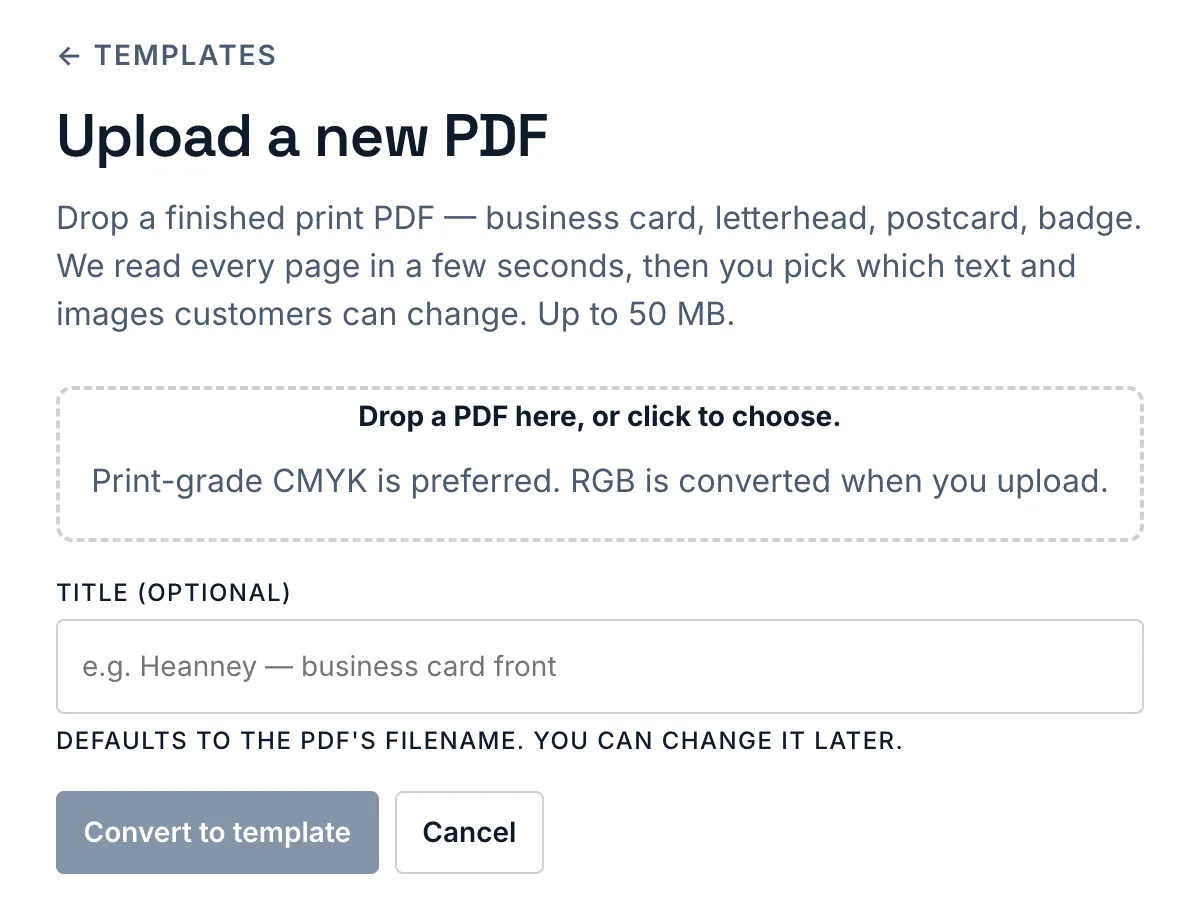
1 · Upload your approved PDF
Start with the file your shop already approved for press. No rebuild, no design tool.
-
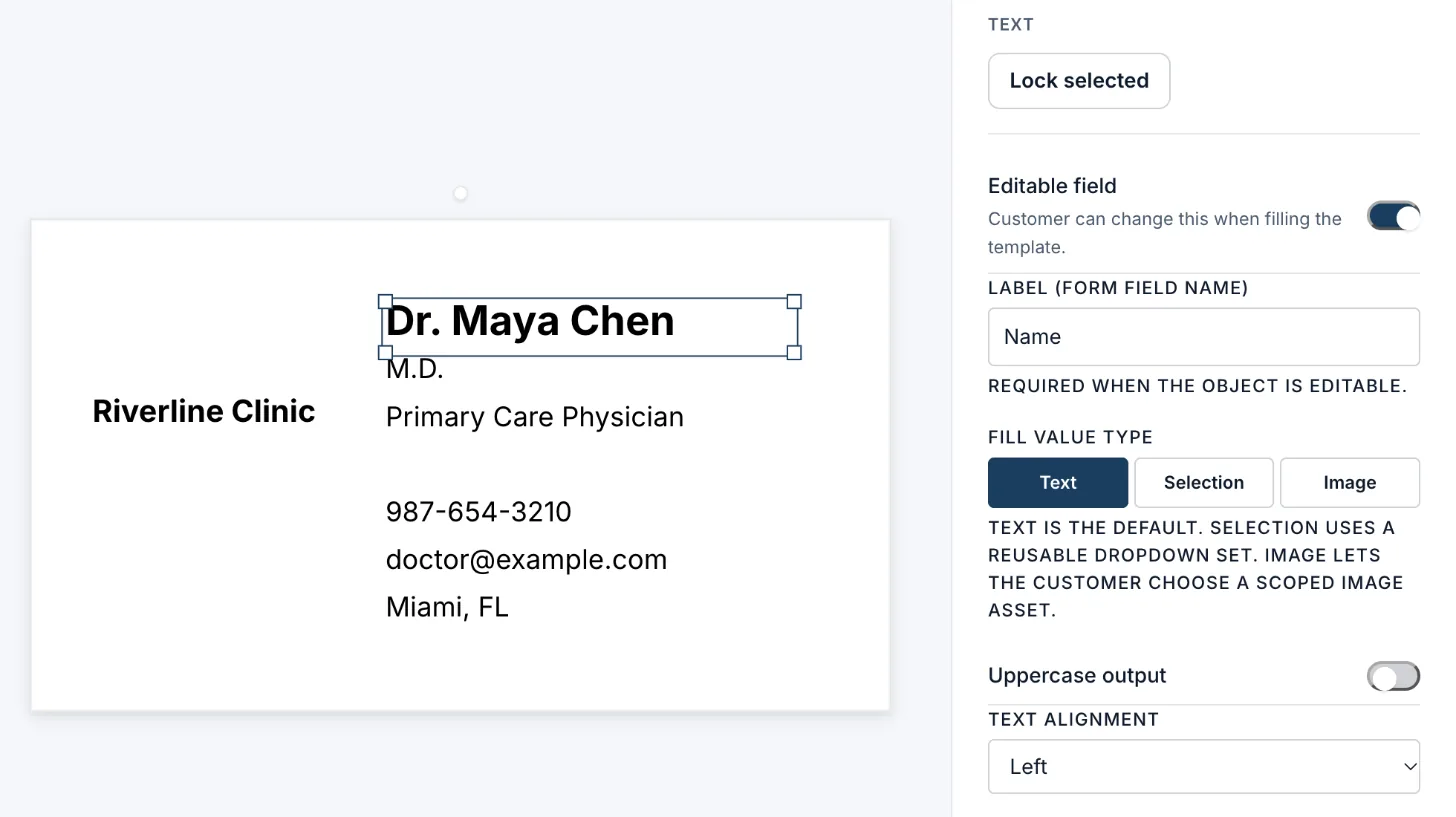
2 · Mark the editable fields
Click a line on the card and switch on Editable field. Text, dropdown or image; everything else stays locked.
-
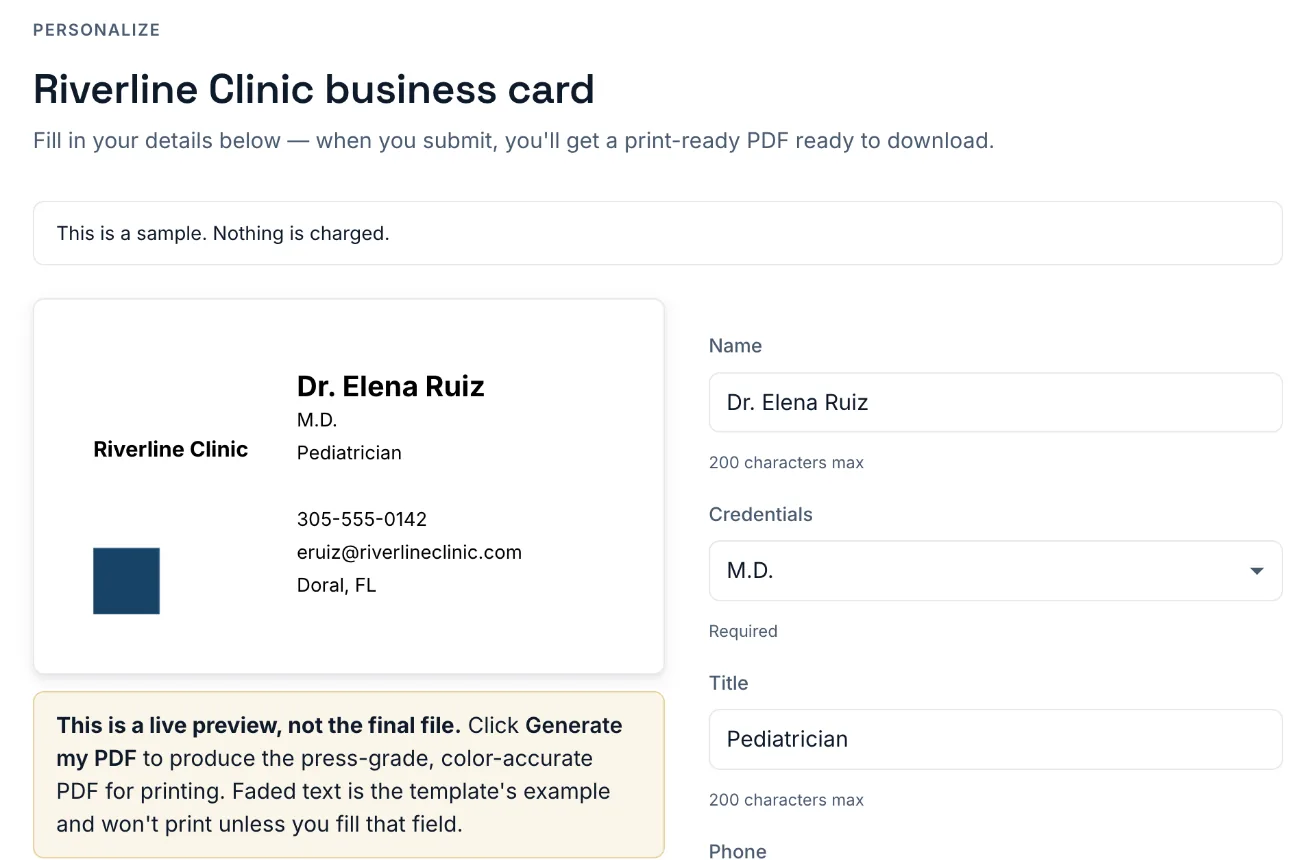
3 · Your customer fills it in
They type into a fill link or your storefront widget, watch the card update, and get a print-ready PDF built from the locked template.
In production
Wells & Drew moved 82 templates from PitchPrint to StackFill.
Wells & Drew, an engraved stationery printer in Jacksonville, Florida since 1855, runs its personalized business cards, letterhead and envelopes on StackFill, each one made from the print PDF it already presses from.
Wells & Drew on StackFill
- 82 templates moved, 62 live on wellsdrew.com
- Nothing redrawn: every template is the shop's own press PDF
- The proof customers approve and the press file come from one renderer
Not ready to upload?
Check a print PDF free: bleed and trim, color space, font embedding, ink coverage and image resolution. No account, and the file isn't kept.
Upload your master file
Drop in a finished print PDF — business cards, letterheads, badges, postcards. Its trim and bleed boxes and CMYK values carry through to the final PDF unchanged.
Mark what's editable
Click the fields a customer should fill — name, title, phone — and lock everything else with one toggle. Set fonts per element or one default for the whole stack. Brand stays exactly on-brand.
Send a fill link
Hosted by us, or embedded on your site with your logo and colors. Customer types in fields, previews against your design, and final output is generated from the locked template.
Hosted fill links
Send a customer a StackFill link. They personalize and receive output based on access rules.
Storefront embed
Drop StackFill into a product page. The customer personalizes before checkout; your store receives a fill ID.
Built for the trade
Print shops still editing every variant by hand. Corporate marketing teams spinning a hundred badges off one master. Agencies sending personalization links to clients instead of versioning by hand. One template feeds one customer or a thousand — same engine.
The renderer path is built for print-production concerns like CMYK-aware output, trim boxes, registration marks, and preflight feedback. No headless-Chromium page capture tricks.
What's not StackFill
- Not a design tool — you don't create artwork from blank canvas.
- Not an e-sign or generic PDF form — we produce print-grade CMYK collateral.
- Not a storefront or print MIS — we drop into the one you have.
- Not a template marketplace — your file is the template.
Guides for print-file personalization
- Rich black CMYK builds and a TAC calculator
C60 M40 Y40 K100 and six other blacks against real ink limits. - Web to print without rebuilding templates
Port the PDF you already have instead of recreating it in an editor. - Online PDF proofing with a live preview
What a customer proof has to show before it is worth approving. - Let customers edit a PDF without changing the design
Element-level locking for fonts, color and layout. - Variable data PDFs without InDesign
Run personalized batches from a finished PDF and a CSV. - The preflight errors that cause reprints
An intake checklist for color, bleed, fonts and ink coverage. - Franchise template management
Lock the brand, free the local details, push updates once.